Category: Apps

Guides and articles from the TD Film Studio apps section.

  • The 20-20-20 rule: how to do it and why it helps

    The 20-20-20 rule: how to do it and why it helps

    The 20-20-20 rule says: every 20 minutes, look at something about 20 feet (6 metres) away for at least 20 seconds. It gives the eye’s focusing muscles a rest during long screen work, and it is a simple way to ease tired, dry or aching eyes.

    How to do it, step by step

    • Work for 20 minutes.
    • Look away from the screen at something about 20 feet (6 metres) away: a window, a far wall, the street.
    • Hold your gaze there for at least 20 seconds and let your eyes soften.
    • Blink slowly a few times, then go back to work.

    Why it helps

    Looking at a screen keeps the muscles that focus the eye working up close for hours, and we blink less while we do it. A regular look into the distance relaxes those muscles and lets you blink normally again. Many eye-care organisations suggest it for screen eye strain. It eases strain; it does not cure an eye condition.

    Make it a habit

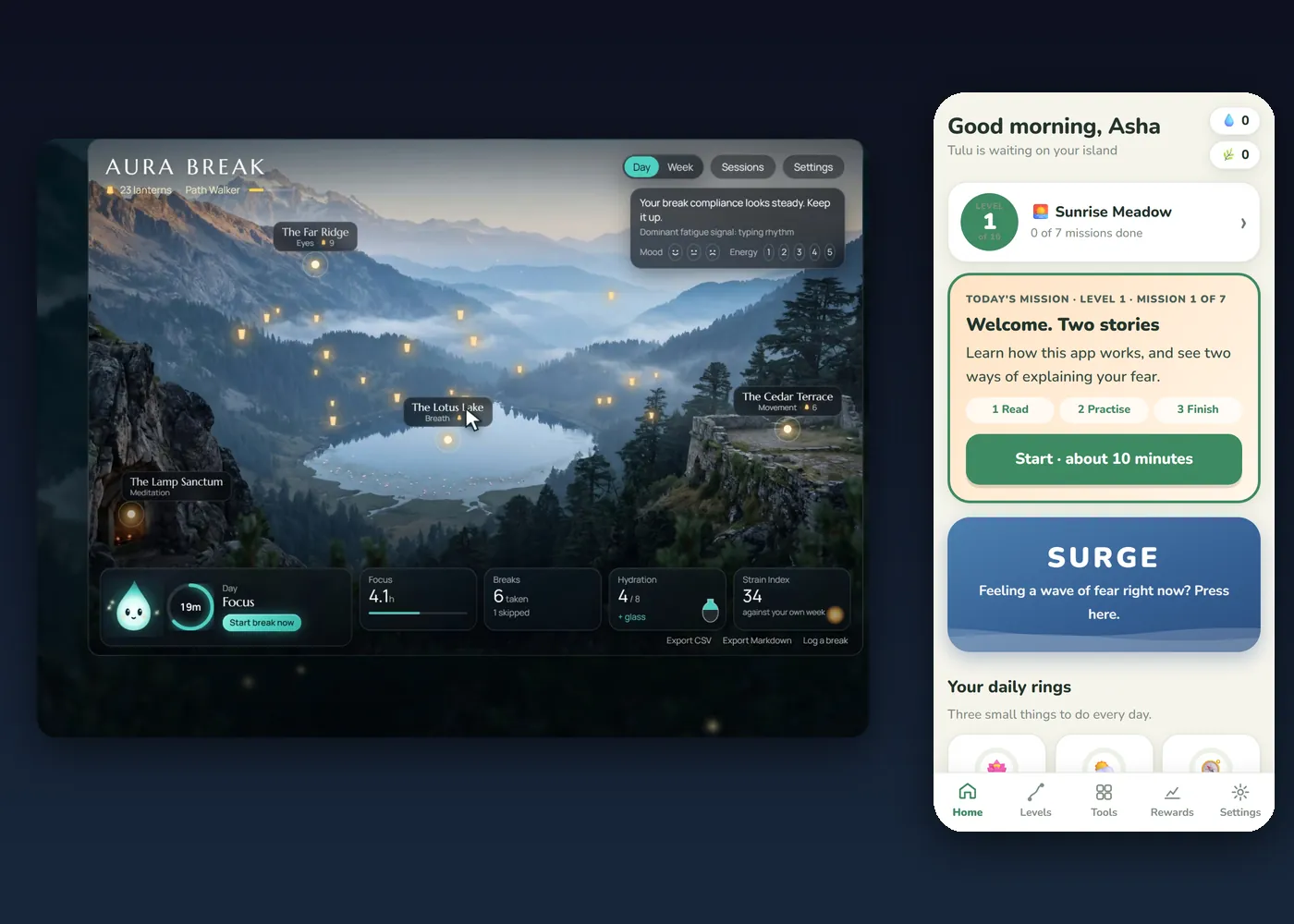
    The rule fails for one reason: we forget. Set a repeating 20-minute timer, or use a break reminder that does the counting and tells you where to look. AURA BREAK turns the rule into a short voiced break so you can simply follow it.

    Make it work better

    • Blink fully, not halfway, during the 20 seconds.
    • Keep the screen about an arm’s length away, with the top at or just below eye level.
    • Light the room so the screen is not the brightest thing in it.
    • Take a longer break every hour: stand up, stretch and look outside if you can.

    When to see an eye doctor

    If your eyes hurt a lot, your vision changes suddenly, or the strain does not ease with rest, see an eye doctor. Educational wellbeing guidance, not medical advice. If you are worried about your health, talk to a doctor.

    More from the studio

    See our guide to eye strain relief and our other apps and guides.

    Frequently asked questions

    Is it 20 feet or 6 metres?

    Both: 20 feet is about 6 metres.

    Do I have to stand up?

    No. You only need to look at something far away. Standing is a bonus.

    Is 20 seconds enough?

    20 seconds is the minimum. A little longer is fine.

  • Cyberchondria: why searching symptoms makes worry worse

    Cyberchondria: why searching symptoms makes worry worse

    Cyberchondria is the cycle where searching for symptoms online raises your worry instead of calming it. You search to feel safe, find a frightening possibility, worry more, and search again. Breaking the cycle starts with changing what you do at the moment of the urge.

    How the cycle works

    Something in your body feels odd. You search. The results list rare, serious causes next to ordinary ones, and your mind fixes on the worst. The worry rises, so you search again for something that finally feels certain. It never does, and the short relief of each search teaches your mind to repeat it. Cyberchondria is not an official diagnosis; it is a common name for this pattern.

    Why searching rarely reassures

    Search results cannot examine you. They offer possibilities, not answers, and uncertainty is exactly what an anxious mind cannot bear. Each search trains you to treat uncertainty as an emergency.

    Six steps to break the cycle

    • Notice the urge and name it. Say: “This is the urge to search.”
    • Wait twenty minutes. Urges rise and fall. Do something else until it passes.
    • If you must look, look once. One trusted source, one time, then close it.
    • Write the worry down instead of typing it into a search box.
    • Move your body. A short walk or a few slow breaths changes how the worry feels.
    • Take real symptoms to a doctor. Sudden, severe or lasting changes need a person, not a search.

    When to get help

    If health worry is taking over your days, sleep or relationships, talk to a doctor or a mental-health professional. You do not have to manage it alone.

    A gentler path

    Calm Path is a self-guided app for people who worry about their health. It turns these steps into small daily missions with calming tools for the moment the urge hits. It is self-help and does not replace professional care. Educational wellbeing guidance, not medical advice. If you are worried about your health, talk to a doctor.

    Frequently asked questions

    Is cyberchondria a real diagnosis?

    It is not an official diagnosis. It is a common name for repeated, anxious searching about symptoms.

    How do I stop googling my symptoms?

    Notice the urge, wait twenty minutes, look at one trusted source once if you must, and take real symptoms to a doctor.

    Does it mean something is wrong with me?

    No. It is a very common pattern, and it responds well to changing the habit.

  • Android app development in India: how to plan it

    Android app development in India: how to plan it

    To plan an Android app in India, decide who it is for, what it must do without a connection, how it will be tested, and where it will be published. The time and cost follow from those four decisions far more than from the technology.

    1 · Start with one user and one job

    Write one sentence: “This app helps [who] to [do what].” If it needs two sentences, it is two apps. A focused first version is easier to finish, test and explain on a store page.

    2 · Decide what must work offline

    Many users in India face weak or expensive connections, so an app that works offline is a real advantage. It also removes servers, accounts and much of the privacy paperwork. Decide early which parts, if any, truly need the internet.

    3 · What drives time and cost

    • The number and complexity of screens.
    • The content: writing, voice, sound, music, animation and images. This is often larger than the code.
    • Platforms: Android only, or Android and Windows.
    • Accounts and servers: an app that needs logins and a backend costs more than one that does not.
    • Testing on real phones, across screen sizes and Android versions.
    • Store requirements: the listing, the privacy policy, the data safety form and Google’s testing rules. See our guide to Google Play developer accounts.

    A small, focused offline app usually takes weeks, not days. Larger apps take months. Store review and testing add time on top.

    4 · What to put in your brief

    • Who the app is for, and what they do today without it.
    • The one job it must do, and three things it need not do.
    • Which languages it should speak.
    • Whether it must work offline.
    • Where you want it: Google Play, Windows, or both.
    • Any content you already own: text, voice, images, brand.

    5 · Choosing who builds it

    Whoever you choose, ask who will be your single point of contact, who writes the content, how testing is done on real devices, and who prepares the store listing. At TD Film Studio one contact looks after the whole job, including voice, sound and animation made in-house. See app development or start a project.

    Frequently asked questions

    How long does it take to build an Android app?

    A small, focused app usually takes weeks, not days, and larger apps take months. Testing and the store’s requirements add time.

    Should my app work offline?

    If it can, yes. Offline apps are faster, more private and work on weak connections.

    What should I prepare before I talk to a developer?

    One sentence on who the app is for and what it does, the languages you need, and any content you already have.

  • Best offline apps: how to tell an app really works offline

    Best offline apps: how to tell an app really works offline

    The best offline apps keep working with no signal and no account: you open them and they run. Many apps that say “offline” still need to sign in, load content or send your data somewhere. These five checks take two minutes and tell you which kind you have.

    What “works offline” really means

    A truly offline app does its whole job on your device. It does not need to download its content when you open it, it does not wait for a login, and it does not stop when the connection drops. An app that only caches its last screen is not the same thing.

    Five checks before you trust an app

    • The airplane-mode test. Turn on airplane mode, close the app completely, then open it. Can you do the main thing it is for?
    • No account to start. If you must sign up before it will work, it is built around a server, not your device.
    • Look at the permissions. An app that works offline rarely needs internet access. On Android, check the permissions list in the store page or Settings.
    • Nothing downloads on first run. If the first launch waits on a progress bar, the content lives elsewhere.
    • No ads that need a connection. Ads, trackers and analytics all need a network, so apps that run offline are usually free of them.

    Kinds of apps that do well offline

    Reading and note-taking apps, downloaded maps, downloaded music and podcasts, language practice, calculators and other utilities, timers, and anything guided: breathing, stretching and break reminders. Creative tools work well offline too, because a film, a mix or a design should never depend on a signal.

    Why offline-first is worth choosing

    • Privacy. Nothing leaves your device if the app never connects.
    • Reliability. It works on a train, on a set, on a bad connection.
    • Speed and battery. No waiting for servers, no background syncing.

    How we build

    Every app from TD Film Studio is built offline-first and without ads. AURA BREAK and Calm Path need no account and no internet. See all our apps.

    Frequently asked questions

    What does offline-first mean?

    The app is designed to do everything on the device, and any connection is a bonus, not a requirement.

    Do offline apps use mobile data?

    A truly offline app uses none while you use it. Updates, if any, come through the store.

    Are offline apps safer for privacy?

    They can be, because nothing needs to be sent anywhere. Always check the permissions the app asks for.

  • Google Play developer account: personal or organization?

    Google Play developer account: personal or organization?

    A Google Play developer account costs a one-time US$25. The real decision is the account type: a personal account is quicker to open, but new apps must pass a 14-day closed test with at least 12 testers, while an organization account needs a D-U-N-S number and skips that rule.

    What a Google Play developer account costs

    Registration is a one-time fee of US$25, paid to Google. After that you can publish free or paid apps. The fee is the same for personal and organization accounts.

    Personal or organization: how they differ

    • Personal account. You register with your identity and phone number, so it is the quicker route. For personal accounts created after 13 November 2023, every new app must first run a closed test with at least 12 testers who stay opted in for 14 days in a row. The developer name shown on the store is your own legal name.
    • Organization account. You need a D-U-N-S number for the organization. It is free from Dun & Bradstreet and can take up to about 30 days, so apply first. Never pay a third party for it. The 12-tester rule does not apply, and the store shows the organization’s name.

    Google also lists some health-related apps among those that need an organization account, so check the current policy if your app touches health. Read Google’s own pages: organization account requirements, testing requirements for new personal accounts and the health apps policy.

    What to prepare before you upload

    • An Android App Bundle (AAB). Google Play takes AABs, not APKs, for new apps.
    • A target Android API level of 36: new apps have needed it since 31 August 2026.
    • A privacy policy page on your own website, and the Data safety form filled in honestly.
    • The content rating questionnaire and a target audience (many small apps choose adults only).
    • Store graphics: a 512 by 512 icon, a 1024 by 500 feature graphic and at least two phone screenshots.

    How to run the 12-tester test

    Ask friends, colleagues or members of your community who have Android phones and a Google account to join. Send them the opt-in link from Play Console, ask them to stay opted in for the full 14 days, and collect their feedback while the clock runs. Start early: the 14 days cannot be shortened.

    What we are doing

    TD Film Studio is preparing its own first apps for Google Play now, so this guide is written from the same checklist we are working through. See our apps. These rules were checked against Google’s own help pages on 5 November 2026. Google changes them, so always confirm in Play Console before you pay or upload.

    Frequently asked questions

    How much does a Google Play developer account cost?

    A one-time registration fee of US$25.

    Do I need a D-U-N-S number?

    Only for an organization account. Personal accounts do not need one.

    What is the 12-tester rule?

    For personal accounts created after 13 November 2023, a new app needs a closed test with at least 12 testers opted in for 14 consecutive days before it can go to production.

  • Office stretches you can do at your desk

    Office stretches you can do at your desk

    Guide

    Hours in a chair tighten the body. These office stretches take about a minute each and need no equipment.

    Neck side stretch

    Let your right ear drop toward your right shoulder. Hold for five slow breaths, then switch sides.

    Chest opener

    Clasp your hands behind your back, lift them slightly and open your chest. Breathe slowly.

    Wrist and forearm stretch

    Extend one arm, palm up, and gently pull the fingers back with the other hand. Hold, then switch.

    Seated back extension

    Place your hands on your lower back and lean back gently over the chair. Hold for a few breaths.

    How often

    A short break every hour is enough to notice a difference. Reminders help, because it is easy to forget.

    Try it

    Let a guide do the timing for you

    AURA BREAK walks you through this with voice and sound, offline. See AURA BREAK. Educational wellbeing guidance, not medical advice. If you are worried about your health, talk to a doctor.

  • Best exercises during work breaks

    Best exercises during work breaks

    Guide

    You do not need a gym to look after a desk-bound body. These five short exercises fit into a break of two to five minutes.

    Neck turns

    Sit tall. Turn your head slowly to the right, hold for five breaths, then to the left. Do not force it.

    Shoulder rolls

    Roll your shoulders backward ten times in slow circles, then forward ten times.

    Wrist circles

    Extend your arms and circle your wrists ten times each way. Gently open and close your fists.

    Seated twist

    Sit tall, place your right hand on your left knee and turn gently to the left. Hold for five breaths, then switch sides.

    Slow breathing

    Breathe in for four, hold for four, out for four, hold for four. Repeat four times.

    A note on safety

    Stop if anything hurts. If you have pain or an injury, ask a doctor or physiotherapist first.

    Try it

    Let a guide do the timing for you

    AURA BREAK walks you through this with voice and sound, offline. See AURA BREAK. Educational wellbeing guidance, not medical advice. If you are worried about your health, talk to a doctor.

  • Eye strain relief: a 2-minute desk routine

    Eye strain relief: a 2-minute desk routine

    Guide

    Eye strain after a long day at a screen is common. This two-minute routine can ease tired, dry eyes. It is wellbeing guidance, not medical advice.

    1 · Look far away (20 seconds)

    Look at something about 20 feet (6 metres) away for 20 seconds. This is the 20-20-20 rule: every 20 minutes, 20 feet, 20 seconds. Let your eyes soften and your face relax.

    2 · Blink fully (10 times)

    When we stare at a screen we blink less and less fully. Close your eyes gently, then open them. Ten slow, full blinks help spread tears across the eye.

    3 · Palm rest (30 seconds)

    Rub your palms together to warm them, then cup them over your closed eyes without pressing. Rest in the dark for half a minute.

    4 · Move your gaze

    Look slowly to the far left, far right, up and down, then draw a slow circle. Keep your head still.

    When to see a doctor

    If your eyes hurt a lot, your vision changes suddenly, or the strain does not ease with rest, see an eye doctor.

    Try it

    Let a guide do the timing for you

    AURA BREAK walks you through this with voice and sound, offline. See AURA BREAK. Educational wellbeing guidance, not medical advice. If you are worried about your health, talk to a doctor.